
Table of Contents
Rotary Encoders
 : Update this Page
This page is to inform you about MIOS' handling of incremental rotary encoders, or just 'encoders' or 'encs' for short.
These are the endless-turning knobs that you can use to set values on your device. These should not be confused with a potentiometer. See the FAQ entry about encoders for more info regarding the distinction between the two, and the Where to order page for retailers.
Encoder Model Specifications
Encoders from SmashTV (2010 and later), VOTI, and SoundWell (ALPS STEC16B and clones)
SmashTV: #18 detented rotary encoder from www.midibox-shop.com
STEC16B clone manufactured by Bourns
24 pulse per rev, DETENTED2 mode
pinout:

VOTI: M-SW-ROT, detented rotary encoder from www.voti.nl
or SoundWell EC162102E1B-HA1-006
Encoder mode: “DETENTED2”, 24 steps per turn
pinout: http://www.voti.nl/docs/rotary-encoder.jpg
if you view the encoder from the top with the pins pointing towards you;
left pin goes to D1 (highest numbered din pin)
middle pin goes to D0 (lowest numbered din pin)
right pin goes to Vs (ground)
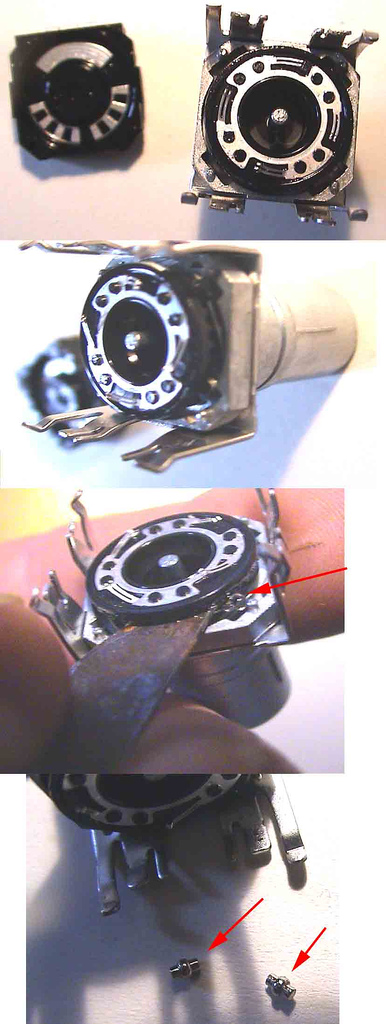
The detents can be removed, but this can cause erratic operation due to loss of contact tension.
To remove the detents:
- Bend the four clasps back

- Remove the bottom

- Bend down (or up, depending on your perspective) the half-circle thingie. (You may choose to flatten the nub, or bend down the metal half-circle. Or you could even go so far as to separate the white plastic from the metal bottom and remove the detent disc completely with no fuss. It snaps right back together (pic coming). Either way will accomplish the job. The point is to move the metal nub that falls into the valleys on the spinning disk.)

- Re attach to the bottom

- Bend the clasps back.
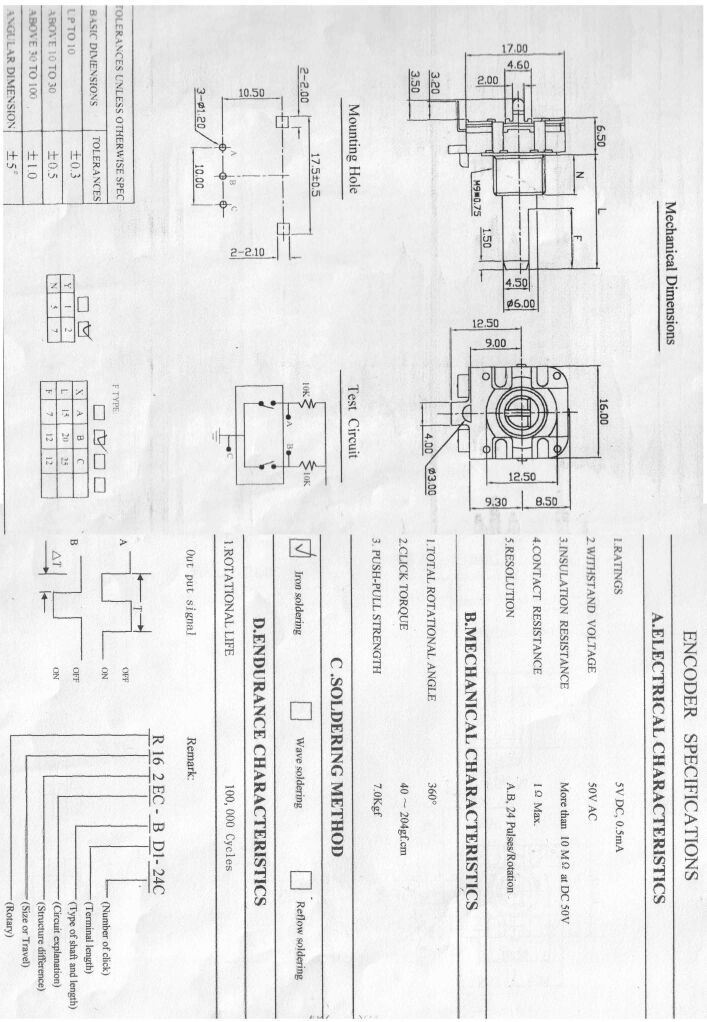
Bourns PEC11-series detented encoders (formerly available from SmashTV through 2008)
24 steps per turn, Encoder Mode “DETENTED2”
Pinout: http://www.midibox-shop.com/images/encspecs17.gif
Note: the rightmost picture is “top down” (as seen from the top of the encoder looking down to the shaft)
pin “A” goes to D1 (connect to the higher numbered DIN pin of the two pins assigned to that encoder)
pin “C” goes to Vs (this pin is “common”)
pin “B” goes to D0 (connect to the lower numbered DIN pin of the two pins assigned to that encoder)
Thanks to…
mandingo: http://www.midibox.org/forum/index.php?topic=3843.msg25094#msg25094
jdutcher: http://www.midibox.org/forum/index.php?topic=3911.msg25766#msg25766
xcoulonx: http://www.midibox.org/forum/index.php?topic=3299.msg23699#msg23699
Encoders from Pollin
Pollin (http://www.pollin.de) has cheap encoders with button.
In MIOS8 1.9g use the new encoder mode “MIOS_ENC_MODE_DETENTED4” (details). Previous versions should use encoder mode: “DETENTED”, 16 steps per turn.
Forum Links
http://www.midibox.org/forum/index.php?topic=6693.0 (German)
http://www.midibox.org/forum/index.php?topic=7140.0 (English)
http://www.mikrocontroller.net/attachment/16120/panasonic.lbr (Eagle lib)
Pinout
(laying the encoder before you, cap pointing towards you, pins on top):
0: GND (button)
1: pin A (eg D0)
2: GND (enc)
3: pin B (eg D1)
4: pin C (button, eg D2)
Removing Detents

Encoder Detent Types
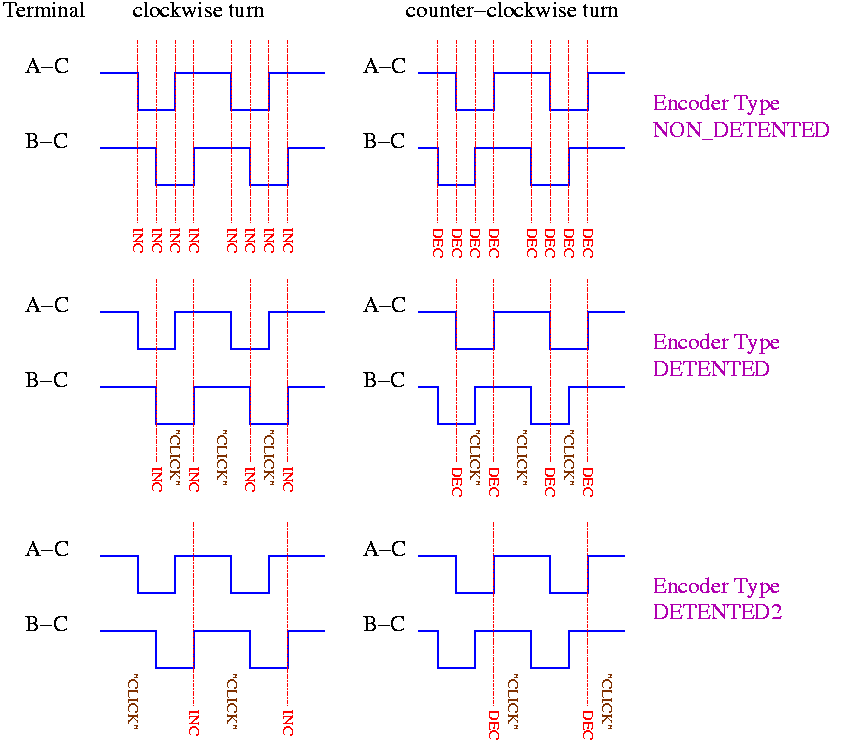
In applications (prior to MIOS8 1.9g), you have to choose one of the encoder types:
MIOS_ENC_MODE_NON_DETENTED
MIOS_ENC_MODE_DETENTED
MIOS_ENC_MODE_DETENTED2
MIOS_ENC_MODE_DETENTED3
This image describes the different encoder modes which are natively supported by MIOS:
The encoders will behave with an 'acceleration' feature, similar to that of the PC mouse - when you turn the encoder faster, the values will increase at a faster rate. This mean that you can turn the knob slowly for more precise adjustment, or turn quickly for coarse adjustment of parameters.
MIOS8 version 1.9g reworks all of the encoder types and adds new ones. (Refer to TK's announcement)
About Encoder Resolution and Detents
Detented encoders mechanically limit their resolution, because one “click” of an encoder may actually run through four events.
Non-detented encoders will feel smoother, like a pot, and will offer the best possible resolution down to the level supported by the software.
The different encoder modes decrease the resolution to compensate for detented action. There is a software enhancement to allow progressive “acceleration” for faster sweeps.
There is no requirement that one use either detented or non-detented encoders - it is ultimately a matter of personal preference and your own requirements (higher resolution, quicker sweeps, tactile feedback/feel, etc.).
In the end, the right software tweaks can help overcome the limitations of a detented encoder. But you can't add tactile feedback (clicks) to a non-detented encoder.
(Source: this forum article)