
Table of Contents
MIDIbox AY V1
Note:
- MIDIBox AY V1 is outdatet and not maintained anymore (!).
- MIDIBox AY (YM) V2 =⇒ http://www.midibox.org/dokuwiki/doku.php?id=midibox_ay_ym_v2
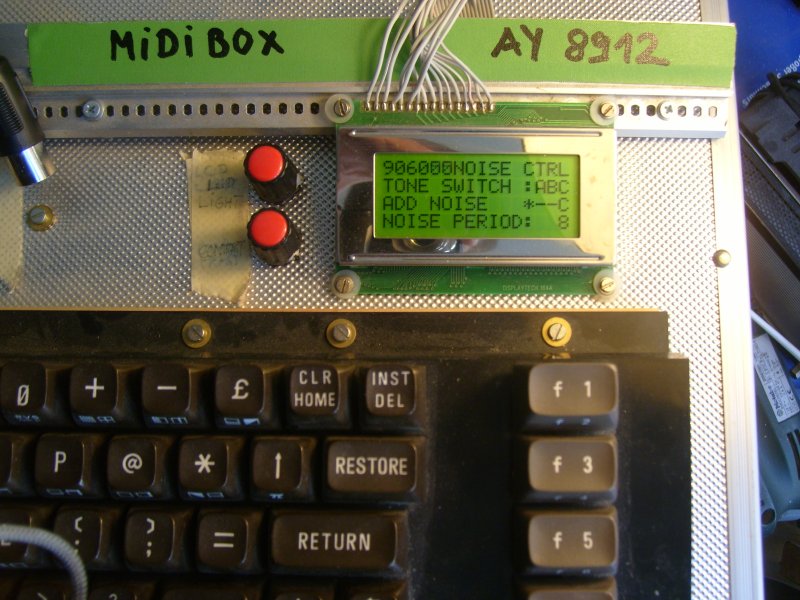
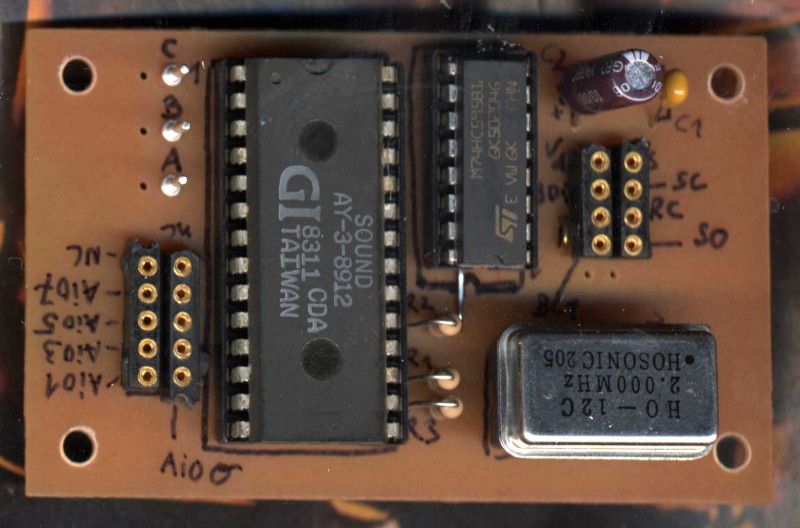
[MIDIBox AY V1 - AY 3 8912 Module]
Overview
The MIDIbox AY V1 is stuffed with a General Instruments AY-3-8912 sound chip. The AY-3-8912 is a 3-voice Programmable Sound Generator (PSG). The AY 3 8912 and its variants became popular chips in many arcade games and was used on the Intellivision and Vectrex video game consoles and the MSX, Atari ST, Amstrad CPC, Oric 1, Colour Genie, Elektor TV Games Computer and Sinclair ZX Spectrum 128/+2/+3 home computers as well as the Mockingboard sound card for the Apple II family (etc.). The PSG contains 3 independent channels (A, B and C), a single noise generator, and a single envelope generator. Each channel includes a square wave tone generator and is capable of mixing any combination of the output from its respective tone generator with the noise generator and the envelope generator. Output from each of the 3 channels is then mixed together to produce the final audio output.
::.
CS
The MIDIbox AY 3 8912 Control Surface based on:
- C64 Keyboard (connected to MBHP DIN/ MBHP DOUT)
- 4×16 LCD
- 20 LEDs (connected to MBHP DOUT)
::.
Hardware
- 1x Core (MBHP Core8 V3, PIC18F452, MIOS 1.9f)
- 1x LCD Module: 4×16 LCD (8bit) | See ⇒ (http://www.midibox.org/users/jim_henry/building_a_midibox_lcd_cable.pdf)
- 1x MIDIBox AY 3 8912 board | See ⇒ midibox_ay_3_8912_board
- 1x C64 Keyboard (C64 Keyboard, 1xDOUT(DOUT1: J3), 1xDIN(DIN1: J3/J4) ) | See ⇒ midibox_ay_keyboard | http://en.wikipedia.org/wiki/Commodore_64
- Optional: CS LEDs (Connection Diagram for 20 LEDs MBHP DOUT(DOUT J4,J5,J6) | See ⇒ midibox_ay_cs_led
- 1x OP AMP Mixer for Tone A B C (CHIP: LM324N (4xOP AMP) +/-12V) | See ⇒ midibox_ay_3_8912_mixer
- PSU +5V (MBHP Core +5V ⇒ AY 3 8912 board), +/-12V ⇒ OP AMP Mixer | See ⇒ (http://www.ucapps.de/mbhp/mbhp_opl3_psu.pdf)
::.
Software Download
MIDIbox AY 3 8912 Software Download (for PIC 18F452 (asm), MIOS 1.9f):
- MIDIBox AY 3 8912 Application V1.00 RC1a ⇒ mbay18f452v1rc1a.zip (22.11.2009)
- Application upload (main.hex) via MIDI ⇒ MIOS Studio
::.
Menu Overview
User Menu (4×16 LCD)
- [←] Menu Overview
- [F1] Patch Menu: load, name and store MIDIBox AY Patches ⇒ PATCH MENU
- [F2] Tune Menu: Detune Tone A, B and C (detune is NOT transpose!) - Details: ⇒ TUNE Tone ABC (MENU)
- [F3] Mixer (On/Off Tone A, B and C; On/Off - On/Off Noise @ A,B and C; On/Off Fx Option A,B and C)
- [F4] Volume Control: Tone A, B and C [0 to 15 dec.] - Details: ⇒ VOLUME Tone ABC (MENU)
- [F5] Envelope Control: Envelope Coarse, Env. Fine, Env. Shape, Env. Assignment to Tone A, B and C - Details: ⇒ ENVELOPE (MENU)
- [F6] Midi Channel Tone A B C
- [F7] Velocity Menu (Switch Velocity to Volume Tone A, B and C or Noise Period)
- [F8] Fx Menu Fx Options - Details: ⇒ Fx Option
Note: C64 Keyboard - [F2] = [SHIFT + F1], F4 = [SHIFT + F3], etc. (press the [SHIFT] KEY first!).
::.
Menu Navigation
- Press [F1] to [F8]
- Step to the next Menu with [CTRL]
- Step to the previous Menu with [SHIFT] + [CTRL]
Item Navigation:
- DOWN ⇒ [CRSR DOWN] (or [RETURN]) - Item pos. +1
- UP ⇒ [CRSR UP (+ SHIFT)] (or [ARROW UP]) - Item pos. -1
Change Value:
- INCREMENT Value +1 ⇒ [CRSR →] or [+] or [>]
- DECREMENT Value -1 ⇒ [CRSR ←|(+SHIFT)] or [-] or [<]
Toggle Tone A, B and C (on/off):
- To toggle Tone A B C on/off just use key [A], [B] and [C] (Mixer Menu via [F3])
- To add “Noise” - same here.
- To toggle ENVELOPE Tone A B C on/off use key [A], [B] and [C] (Envelope Menu via [F5])
::.
MIDIBox AY 3 8912 - Available MIDI Controllers (CC)
Available MIDI Controllers for the MIDIBox AY 8912:
See MIDIBox AY 3 8912 CC LIST ⇒ MIDIBox_AY_3_8912_CC_LIST
:
::.
Project Status
DONE:
- C64 KEYBORD INTERCONNECTION
- SERIAL INTERCONNECTION [ CORE :: J7 → 74HC595 → 8BIT OUT [AY ADRESS/DATA] ]
- HARDWARE INTERCONNECTION of the AY-3-8912 Sound Chip
- 6 MAIN MENUS ON LCD
- Hardware: OP AMP Mixer for Tone A B C
- MIDI EVENT HANDLING (Note On / Note Off)
- (DE)TUNE MENU is working
- KEYBOARD HANDLING: continuous increment/decrement (via [+]/[-] and the LEFT/RIGHT CRSR Key)
- Added a MASTER VOLUME POT [See ⇒ midibox_ay_3_8912_mixer]
- MIDI CH TONE A B C adjustable
- AY 3 8912 Board (PCB), pdf added (thanks nILS!)
- VELOCITY MENU - switch Velocity to to volume Tone A, B, C and Noise Period [Press F7]
- Menu Navigation with CTRL key
- Keyb.: [CTRL] + [SHIFT] = Step one Menu back
- CONTROL CHANGE: CC 1-22 | See ⇒ midibox_ay_3_8912_cc_list]
- Created a MIDIBox AY 3 8912 - VOLUME MENU page | [See ⇒ midibox_ay_3_8912_volume]
- Enabled PITCH BEND @ Tone A, B and C
- SAVE INT. PATCH TO PIC EEPROM (AY Sound Patch Menu)
- Fx Option
- CS LED'S
- Bankstick Patches (MIDIBox AY V1.00)
WHAT'S NEXT? - Future Plans: MB AY (YM) V2
[Date: 12.04.2011]
::.
Pictures
::.
Links
* Midibox AY (V1) ⇒ http://midibox.org/forums/topic/10859-midibox-ay-3-8912/
* The AY 3 8912 Chip ⇒ en.wikipedia.org AY-3-8912
* AY-3-8910 AY-3-8912 AY-3-8913 Datasheet ⇒ AY_3_8913_datasheet.pdf
* The Programmable Sound Generator (PSG) ⇒ PSG (intelliwiki)
* Mockingboard ⇒ http://johnson.tmfc.net/apple/mockingboard.html