
Table of Contents
MIDIBox AY (YM) V2
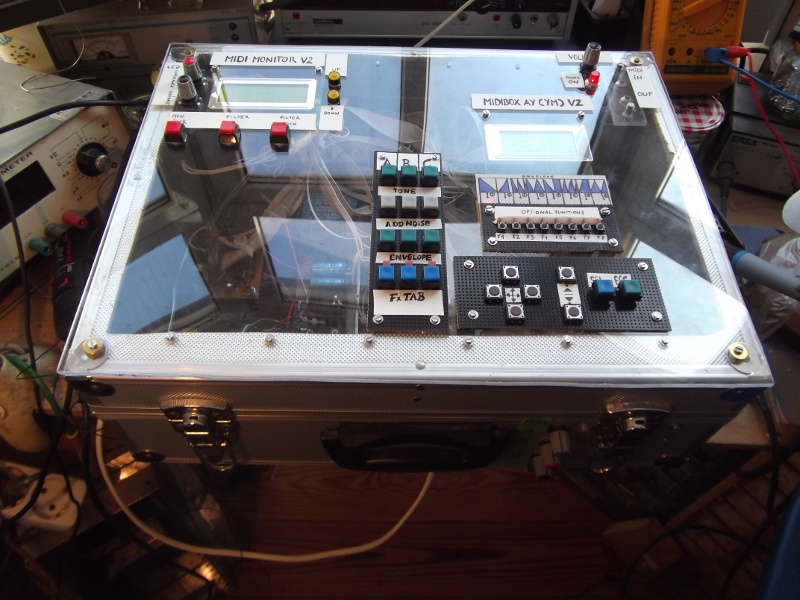
1.Overview
The MIDIbox AY (YM) V2 is stuffed with a single AY-3-8912, an AY-3-8910 or an YM2149 sound chip. This kind of Chip is a 3-Voice Programmable Sound Generators (PSG). This means they have a 3-Voice-Square-Wave (Tone ABC) + one global Noise generator.
The AY38912 and its variants became popular in many arcade games and were used on the Intellivision and Vectrex video game consoles and the MSX, Atari ST, Amstrad CPC, Oric1, Colour Genie, Elektor TV Games Computer and Sinclair ZX Spectrum 128/+2/+3 home computers as well as the Mockingboard sound card for the Apple II family (etc.).
The MIDIbox AY (YM) offer Tone A, B and C (3 independent MIDI channels) and one additional single shiftable noise generator. In addition there is a single (global) envelope generator. The MIDIbox AY (YM) V2 is capable of mixing any combination of the output from its respective tone generator with the noise generator and the (global) envelope generator. The Audio Output from each of the 3 channels (Tone ABC) is then mixed together to produce the final Audio Output.
2.Control Surface
The MIDIbox AY (YM) Control Surface based on:
- 4×16 LCD
- 31 LEDs (connected to one MBHP 4xDOUT module)
- 28 Buttons (connected to one MBHP 4xDIN module)
3.Global Hardware Setup
- 1x Core (Core8 V3, PIC18F4685, MIOS 1.9g)
- 1x LCD Module: 4×16 LCD (8bit)
- 1x MBHP DINx4 (28 Buttons)
- 1x MBHP DOUTx4 (28x LED)
- 1x OP AMP Mixer for Tone A B C (CHIP: LM324N (4xOP AMP) +/-12V) Bipolar 12V PSU
- PSU +5V (MBHP Core +5V ⇒ AY 3 8912 board)
- Gate: Core8 Pin J14 | GATE (0V / +5V) @TONE A MIDI CH » Note ON (+5V) Note OFF (0V)
4. Parts list
AY-3-8912 Board Parts List
| Part | Value | Type | Qty | Package | Mouser Ref |
|---|---|---|---|---|---|
| IC1 | AY | AY-3-8912 | 1 | DIL28 | / |
| IC2 | 74HC595N | 74HC595N | 1 | DIL16 | 595-SN74HC595N |
| Q1 | 2MHz | Q | 1 | Q | |
| R1,R2,R3 | 10k | Resistor | 3 | 291-10k-RC | |
| C1 | 10nF | Capacitor Ceram | 1 | ||
| C2 | 100µF | Capacitor Elec | 1 |
YM2149 Board Parts List
| Part | Value | Type | Qty | Package | Mouser Ref |
|---|---|---|---|---|---|
| IC1 | YM2149 | YM2149F | 1 | DIL40 | / |
| IC2 | 74HC595N | 74HC595N | 1 | DIL16 | 595-SN74HC595N |
| Q1 | 2MHz | Q | 1 | Q | |
| R1,R2,R3 | 10k | Resistor | 3 | 291-10k-RC | |
| C1 | 10nF | Capacitor Ceraù | 1 | ||
| C2 | 100µF | Capacitor Elec | 1 |
.
5. Compatible Soundchips
- Warning: Chips with no Noise (just Tone ABC):
AY38912A/P MicrochipAY38910A/P MicrochipAY-3-8912A CBA GI (reported by johnmx)
- No Problems with Noise:
- AY38912 CDA GI
- YM2149F Yamaha
- AY38912/P CEA Microchip
- AY-3-8912A CBA GI (reported by johnmx) [Since MBAY V2.2, HW update: there is a need for a RESET line]
- AY38912A/P Microchip [Since MBAY V2.2, HW update: there is a need for a RESET line]
- AY38910A/P Microchip [Since MBAY V2.2, HW update: there is a need for a RESET line]
- (let me know if you have successfully tested other chips!)…
6. MBAY V2 Software
Last Changes
- [BUILD 20120109] LCD text correction
- [BUILD 20120109] MIDI Program Change do only take effect on MIDI Channel of Tone A (!)
- [BUILD 20111128] MIDI Program Change (0 = Load Internal Patch, 1-127 = load Bankstick Patch) implemented
- [BUILD 20111128] Found a Bug in Fx Function (Note#1-3 ABC)
- [BUILD 20111128] Some MIDI CC LCD Screen refresh improvements
- [BUILD 20111128] Core8 J14 MIDI NOTE ON GATE PIN (@TONE A MIDI CH » Note On/OFF (Note On = +5V / Note Off = 0V))
- [BUILD 20110909] New FX Editing Shortcuts
- [BUILD 20110909] LCD: Blinking Cursor
- [BUILD 20110909] Debugged FX Table Function defect
- [BUILD 20130821] AY38912A/P Microchip Noise enabled.
- [BUILD 20130821] V2.2: There is an need for HW modification: RESET line added (See: CS-Button & LED Config / 4xDOUT pin 31)
- [BUILD 20130825] V2.3: HW-Update → TONE ABC MIDI ACTIVITY LED added (MBHP DOUTx4: LED TONE A=28,B=29,C=30)
- [BUILD 20130829] V2.3A: corrected “FX TABle ENVelope Shape 1-8 function”
- [BUILD 20130831] V2.3B: corrected Note on ABC / FX ENVelope Time Coarse/Fine execution
7. Patches
Patches - Basic Setup:
Q: I can set all Bankstick Patches to MIDI CHANNEL 5 on Tone A - but it's a long procedure - by default all patches are assigned to MIDI CHANNEL 1 on Tone A. I use channel 5 (Tone A),6 (Tone B),7 (Tone C). Is there any Trick?
A: Switch to Patch 0 (int. patch) and do all basic settings (MIDI CHANNEL, Tone ABC setup, etc.). After that do format the Bankstick. Now all Bankstik Patches will have these basic settings.
Patches - Fx Table (Fx Functions):
- midiboxay_v2_fx_tab_button_shortcuts.pdf (08/2013)
- midiboxay_v2_fx_tab_planer_a3.pdf (08/2013)
- midiboxayv2fxtabplaner.xls (08/2013)